


Last updated on January 19, 2026
The NSFAS portal is used by students to check application status, registration, accommodation, and funding decisions. However, many students experience login errors, blocked actions, or messages such as “Registration received for bursary” without being able to proceed. This guide explains how the NSFAS portal works, common problems students face, and what each status actually means.
Key Takeaways
- Successful login does not mean funding is active
- “Registration received for bursary” is not final approval
- Accommodation access opens only after full funding activation
- Most errors are caused by institutional delays, not student mistakes
- Do not submit duplicate applications unless instructed
Table of Contents
What Is the NSFAS Portal Used For?
The NSFAS portal is an online system used by applicants and funded students to manage their NSFAS bursary or loan information.
Through the portal, students can:
- Log in and view their application status
- Check whether they are funding eligible
- Track registration submission
- Access the NSFAS accommodation portal
- Monitor funding across different academic years
It is important to understand that the NSFAS portal does not operate independently. Most actions depend on confirmation from your institution.
What You Need Before Logging In
To sign in to your MyNSFAS account, you only need three things:
- The phone number registered on your NSFAS profile
- Your ID number
- Your MyNSFAS password
If you changed your number recently, make sure it is updated in the system. NSFAS uses your number for OTP verification, password resets and account security. If your phone is lost or you no longer have access to the original number, you will need to update it inside MyNSFAS before the system lets you proceed.
How to Log In to MyNSFAS (Fastest Method)

The quickest way to access your account is through the official portal. Most NSFAS login issues happen when students use old bookmarked links or unofficial sites circulating on social media. Here is the cleanest path to follow:
1. Visit the Official NSFAS Login Page
Use the direct URL:
https://my.nsfas.org.za/
2. Enter Your ID Number
This confirms your profile and loads your registered details.
3. Type Your Password
Make sure it matches the one created during your registration. If the page reloads without moving forward, clear browser cache or use an incognito tab.
4. Verify the OTP (If Requested)
NSFAS uses one-time PIN codes for extra security. The system sends the OTP to the mobile number linked to your account, so ensure the phone is nearby.
5. Click “Login” and Wait for Redirect
Once logged in, the dashboard shows your funding status, application stage, allowances and personal details.
If the page is slow, wait a few seconds. The portal often becomes busy during application windows and registration periods.
What You Can Do Inside Your MyNSFAS Account
The portal is the central hub for all your NSFAS updates. Students can use the dashboard to check:
- Funding status (successful, provisionally funded, evaluation, not funded)
- Allowance amounts and payment timelines
- Personal details linked to your profile
- Application progress for the 2025–2026 cycle
- Supporting documents uploaded to NSFAS
- Notifications from the financial aid system
For those who want a full breakdown of how funding is paid each month, you can read our detailed NSFAS Allowances Guide on Smart Africa Guide.
Forgot Password? Here’s the Fastest Reset Method
If you cannot log in because you forgot your password, follow these steps:
- Go to https://my.nsfas.org.za/
- Click “Forgot Password?”
- Enter your ID number
- Choose whether to receive your OTP via SMS or email
- Enter the OTP
- Create a new password and confirm it
Make sure your new password is stored safely. Students often lock themselves out after setting a complex password they cannot remember.
If you don’t receive your OTP, restart your phone or insert your SIM card into another device temporarily. Telcos sometimes delay delivery, especially during high-traffic periods.
If the NSFAS Login Page Is Not Working
When the portal is down, the problem is usually on NSFAS’s side, especially during deadlines or funding announcements. Here are quick checks:
- Try refreshing the page
- Switch to incognito mode
- Use your mobile network instead of Wi-Fi
- Try Chrome or Edge instead of Safari
- Clear cookies and temporary files
If the site still does not load, wait a few minutes and try again. The NSFAS team sometimes performs system updates that temporarily affect the login page.
For those who want to track their funding more reliably, our NSFAS Status Check guide explains alternative ways to verify your current position without logging in.
What Does “Registration Received for Bursary” Mean on NSFAS?
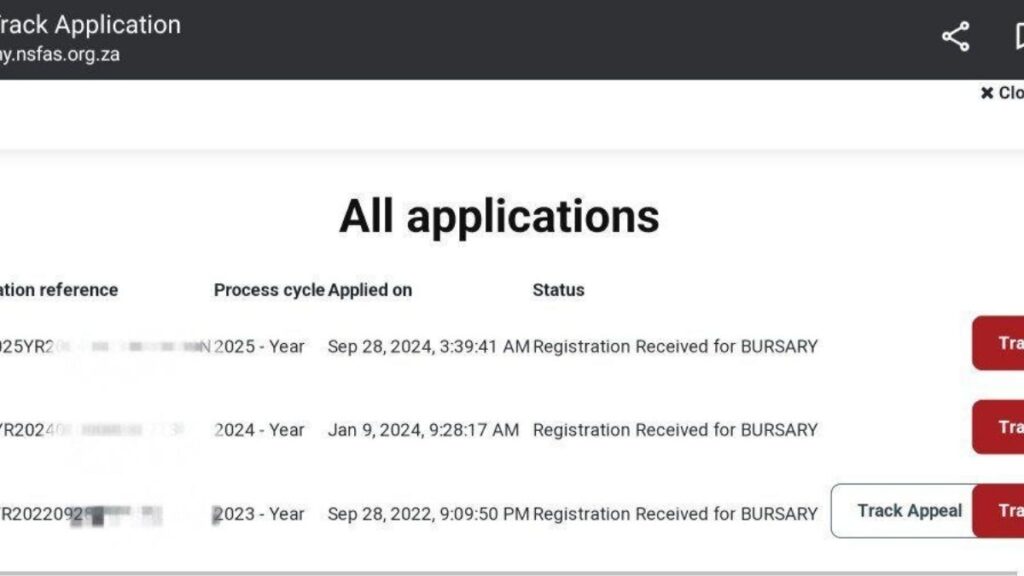
When your status shows “Registration received for bursary”, it means:
- NSFAS has received registration data from your institution
- Your funding is not yet fully activated
- Final checks are still in progress
This status does not mean funding has been paid or that accommodation access is unlocked. It simply confirms that your institution submitted your registration details to NSFAS.
This stage often appears before allowances and accommodation are enabled.
Why Does NSFAS Say “You May Not Proceed at This Time”?
This message usually appears when a student tries to access the accommodation or funding section too early.
It means:
- Your funding is not yet fully approved
- NSFAS is waiting for institutional confirmation
- Internal checks are still ongoing
This is a system timing issue, not a rejection.
Students should wait for the portal to update or contact the student finance office, not NSFAS directly.
NSFAS Funding Eligible but Cannot Access Accommodation
Being marked as “funding eligible (bursary)” means you qualify based on financial and academic criteria. However, accommodation access only opens when:
- Funding is fully approved
- Registration is confirmed by the institution
- NSFAS and institutional systems are synchronised
If any of these steps are incomplete, accommodation remains locked even though eligibility shows positive.
Cannot Login to NSFAS Portal but Details Are Correct
If login fails even with correct details, it may be due to:
- System maintenance
- Temporary server overload
- OTP delivery delays
- Browser or cache issues
Try:
- Clearing browser cache
- Using a different browser
- Logging in during off-peak hours
- Avoiding multiple login attempts in a short period
Repeated attempts can temporarily block access.
Why NSFAS Portal Shows Multiple Academic Years
Some students see multiple years listed under All Applications.
This is normal if:
- You applied in previous years
- You were funded before
- You submitted an appeal
- Your funding rolled over
Each year is treated as a separate process cycle, even if funding continues.
NSFAS Portal Shows Errors but Institution Confirms Registration
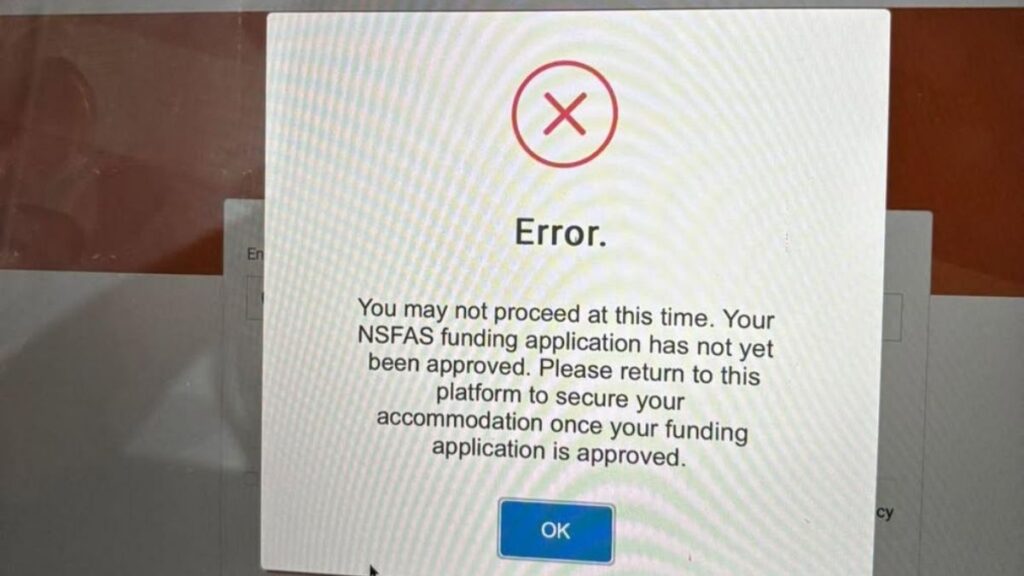
This usually indicates a data sync delay.
Institutions submit registration and funding data in batches. NSFAS updates the portal after verification. During this gap:
- Portal errors may appear
- Actions remain blocked
- Status looks inconsistent
This does not mean you should submit a new application.
What To Do If NSFAS Portal Is Blocking You
Follow this order:
- Confirm your registration status with the institution
- Contact the student finance office, not NSFAS call centre
- Wait for NSFAS portal updates after registration submission
- Avoid duplicate applications or appeals unless instructed
Most portal issues resolve automatically once institutional data is fully processed.
When Should You Contact NSFAS Directly?
Only contact NSFAS if:
- Institution confirms submission but portal does not update after several weeks
- You receive an official NSFAS communication requesting action
- An appeal decision requires clarification
For registration or accommodation issues, the institution remains the primary point of contact.
Can You Cancel an NSFAS Application If the Portal Is Stuck?
Yes, in specific situations. If you no longer need funding or submitted incorrect details, cancellation of NSFAS Application may be appropriate.
How to Keep Your Account Secure
Because MyNSFAS contains personal and financial details, students must keep their login safe at all times.
Follow these simple rules:
- Never share your password with friends or classmates
- Avoid logging in on public computers
- Keep your phone number updated
- Use a password that only you know
- Log out after every session
If you receive SMS messages asking for your NSFAS details, ignore them. NSFAS never asks for passwords through texts or WhatsApp.
Final Advice for Students
The NSFAS portal reflects process stages, not instant decisions. Delays, blocked actions, and error messages are common during peak registration periods. In most cases, no action is required from the student other than waiting for institutional confirmation.
Understanding how the portal works helps avoid unnecessary stress and incorrect applications.

Tarun Asrani is the founder and editor-in-chief of SmartAfricaGuide. With extensive experience in digital publishing and content strategy, he leads the platform’s focus on finance, scholarships, e-learning, and career opportunities shaping Africa today. Tarun visits Africa twice a year, gaining first-hand exposure to local education systems, job markets, and emerging technologies. He also closely follows African news, university updates, and government initiatives to ensure SmartAfricaGuide delivers timely, accurate, and practical insights grounded in real regional experience.

