

Last updated on January 13, 2026
If you have ever searched for how to pay NHIF via M-Pesa, you are not alone. Thousands of Kenyans ask this each month, especially after the National Hospital Insurance Fund (NHIF) transitioned into the Social Health Authority (SHA) in 2024.
The process of paying your contributions, whether you are self-employed or employed, is now simpler and more transparent. This updated 2026 guide explains how to pay NHIF via M-Pesa in Kenya, both via phone and online, covering everything from payment deadlines and penalties to Paybill numbers and how to confirm your payment status through SMS.
Quick Glance
- Dial *334#
- Select “Pay Bill”
- Enter NHIF PayBill number
- Use your NHIF number as the account
- Enter amount and confirm payment
Table of Contents
What Is SHA and Why NHIF Changed in 2025/2026
In 2024, Kenya replaced NHIF with the Social Health Authority (SHA) to streamline access to healthcare under the new Social Health Insurance Fund (SHIF).
The new system ensures that every Kenyan contributes based on income, while still allowing the self-employed to make fixed payments through M-Pesa Paybill 222222.
Key points from the SHA framework:
- The NHIF Act was repealed and replaced by the Social Health Insurance Act 2023.
- Existing NHIF members automatically transitioned to SHA.
- SHA manages contributions, payments, and claims through its portal — https://sha.go.ke.
- M-Pesa remains the most widely used and accepted payment method for contributors.
Who Should Pay and When
Every Kenyan above 18 years of age is required to register and contribute, whether formally employed or self-employed.
- Employees: Employers remit 2.75 % of gross salary directly to SHA.
- Self-employed: Pay KES 500 per month voluntarily through M-Pesa.
- Dependents: Covered once the main contributor’s account is active.
Payment Deadline: The contribution for each month must reach SHA by the 9th of the following month; late payment results in a 2% penalty on arrears.
How to Register Before You Pay
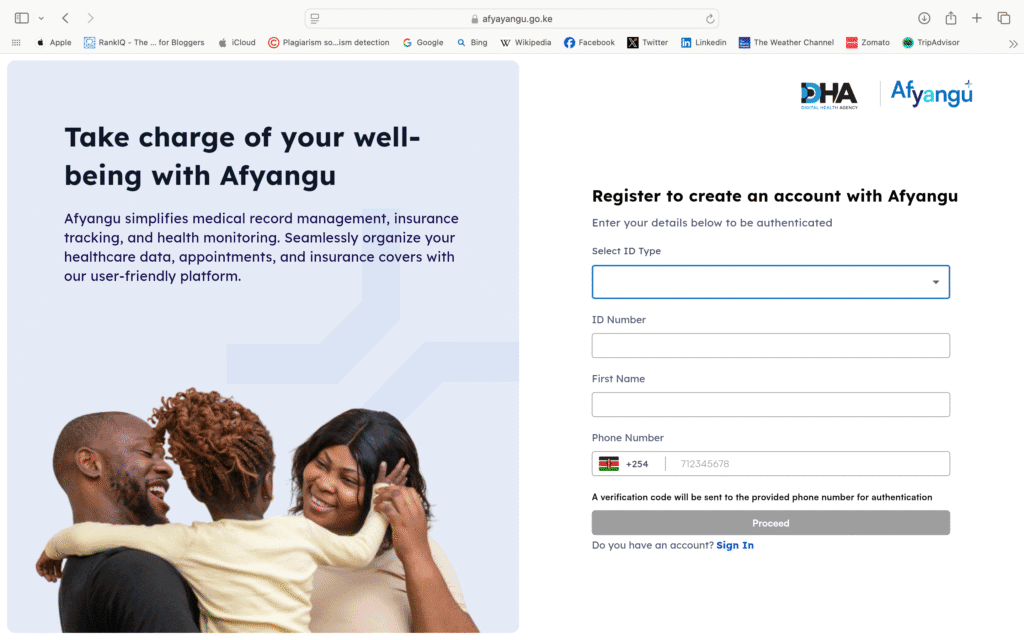
SHA registration via AfyaYangu Kenya
If this is your first time making a payment, you must register with the Social Health Authority (SHA), the new system that replaced NHIF in 2024.
You can register in the following ways:
- Online Portal (Afya Yangu): Visit sha.go.ke and select “Self-Registration” under the Self-Care tab. This redirects to beta.afyayangu.go.ke
- USSD Code: Dial *147# on your phone and follow the prompts.
- Assisted Registration: You can also register at SHA branches, Huduma Centres, or partner health facilities.
Note: SHA registration is not currently available on eCitizen. Most official guides do not mention it as a method.
You will need:
- National ID (or passport for non-citizens)
- Valid phone number (for receiving OTPs and for M-Pesa payments)
- Passport-size photo
- Basic personal details (name, address, DOB, etc.)
- Dependent information (if registering family)
- A working mobile phone for verification and setting up your 4-digit SHA PIN
After successful registration, you will receive a SHA membership number. This number is now used instead of your previous NHIF number when making payments.
Just like when registering on a university portal, the SHA sign-up process also asks for your ID, phone, and personal info.
You can also read our guide on how to register and log in to Kenya’s university e-learning portals.
How to Pay NHIF via M-Pesa (Direct Phone Method)
This is the most common way Kenyans make their monthly contribution.
How to Pay NHIF via M-Pesa Step-by-Step (using SIM Toolkit)
- Go to SIM Toolkit → M-Pesa Menu.
- Select Lipa na M-Pesa → Paybill.
- Enter the NHIF / SHA Paybill Number 222222.
- In “Account Number,” type:
- For normal payments → NHIFM-Your ID Number
- For penalties → NHIFP-Your ID Number
- Enter the amount (minimum KES 500 for self-employed).
- Input your M-Pesa PIN → Confirm.
- You’ll receive a confirmation SMS from both M-Pesa and SHA.
This method works on any Safaricom line and counts as your official contribution.
If you notice pop-up ads interfering with your use of the M-Pesa menu, you can block ads on your Android mobile for a smoother experience.
How to Pay NHIF via M-Pesa Online (SHA Self-Care Portal)
If you prefer to do everything online, the SHA portal offers a smoother experience.
How to Pay NHIF via M-Pesa Steps (using the SHA website)
- Visit https://sha.go.ke.
- Click “Self-Care” and log in using your eCitizen credentials.
- Select “Pay Contributions.”
- Choose whether you are paying for yourself or a dependent.
- Enter your NHIF/SHA Number and amount.
- A pop-up appears on your phone to confirm through M-Pesa STK Push.
- Enter your PIN → Receive confirmation instantly.
Paying for Dependents or Family Members
You can pay for your spouse, children, or parents using the same Paybill.
Simply replace the account number with their NHIF/SHA ID and follow the same steps.
Example:
NHIFM-24719800 → for a dependent registered under your account.
This is helpful for families where one person manages payments for everyone.
How to Pay NHIF Arrears or Penalties
If you miss the monthly deadline, SHA charges a 2 % penalty.
Here is how to pay NHIF arrears:
- Go to Lipa na M-Pesa → Paybill.
- Enter 222222 as the Paybill number.
- Use NHIFP-Your ID Number as the account.
- Enter the penalty amount and confirm.
- Keep both M-Pesa and SHA SMS confirmations for records.
Tip: The system automatically updates your account once arrears are cleared.
2025/2026 SHA Contribution Rates
| Category | Income Basis | Monthly Contribution | Payment Method |
| Self-employed | Flat rate | KES 500 | M-Pesa Paybill 222222 |
| Formal employees | 2.75 % of gross pay | Min KES 300 – no upper cap | Payroll or SHA portal |
| Penalty | 2 % of arrears | Varies | NHIFP-ID via M-Pesa |
| Dependents | Linked to the contributor | – | Paid by the main member |
Note: These 2025 contribution rates are based on official SHA guidelines. Always confirm your exact payment due in the SHA Self-Care Portal before sending money.
How to Check Your Payment or Coverage via SMS
You can confirm payment at any time with a simple message.
- Open your phone’s SMS app.
- Type: ID <Your National ID Number>
- Send to 21101.
- You’ll receive details, including your member number, dependents, and last contribution date.
If the reply is delayed, try again after a few minutes.
What to Do if Payment Fails or Account Is Inactive
Occasionally, M-Pesa or SHA servers may experience delays in updating your account.
If this happens:
- Confirm you used the correct Paybill 222222 and format (NHIFM-ID).
- Check if you received an M-Pesa SMS.
- Wait 10–15 minutes and check via SMS 21101.
- If still missing, contact SHA Customer Care 0800 720 601 or visit the nearest branch.
FAQs
How to Pay NHIF via M-Pesa via phone?
Use SIM Toolkit → M-Pesa → Lipa na M-Pesa → Paybill 222222.
Account Number: NHIFM-Your ID.
What is the new NHIF Paybill?
The Paybill remains 222222, officially recognized by SHA Kenya.
How to pay NHIF arrears?
Use the prefix NHIFP-ID and enter the arrears amount through M-Pesa.
How much is NHIF per month?
Self-employed = KES 500; employees = 2.75 % of gross salary.
What is the new NHIF called?
It’s now the Social Health Authority (SHA) under the Social Health Insurance Fund (SHIF).
Final Thoughts
Paying your health contribution no longer needs to be complicated.
With M-Pesa and SHA Self-Care, you can settle your payments in minutes and stay covered under the new Social Health Insurance Fund.
Always remember:
- Pay before the 9th of each month.
- Keep your confirmation SMS for records.
- Check your status via SMS 21101 or the SHA portal.
Stay informed, stay covered, and always use trusted channels like SHA.go.ke for updates.
Disclaimer:
This article is for informational purposes only and does not represent financial or legal advice. Smart Africa Guide is not affiliated with the Social Health Authority, Safaricom, or any government agency. Always verify Paybill numbers, contribution rates, and deadlines directly from SHA.go.ke or official government channels before making payments.
Varsha Asrani is a lecturer and education writer with experience as Visiting Faculty at AUPP and ATMC College, and as a Lecturer with TalentEdge and UpGrad. She is the Founder of the Asrani Institute of Education and Counselling. Varsha specializes in scholarships, e-learning, and career guidance for African students and professionals, and regularly visits Africa to gather first-hand insights that shape her research and articles.